
When the browser encounters an invalid value for a regular CSS property (for example, a value of 16px for the color property), it discards the declaration, and elements are assigned the values that they would have had if the declaration did not exist.
This is different than a undefined variable in that the variable DOES have a value, the value is just outside of the property’s type or context.
When the CSS variable inside the var() function is invalid, the browser substitute with the initial or inherited value based on the property used.
:root {
   --color-primary: 16px;
}

body {
   color: black;
}

.section-title {
   color: var(--color-primary);
   // invalid and discarded. The browser will use the initial value of black.
}
What’s going on here?
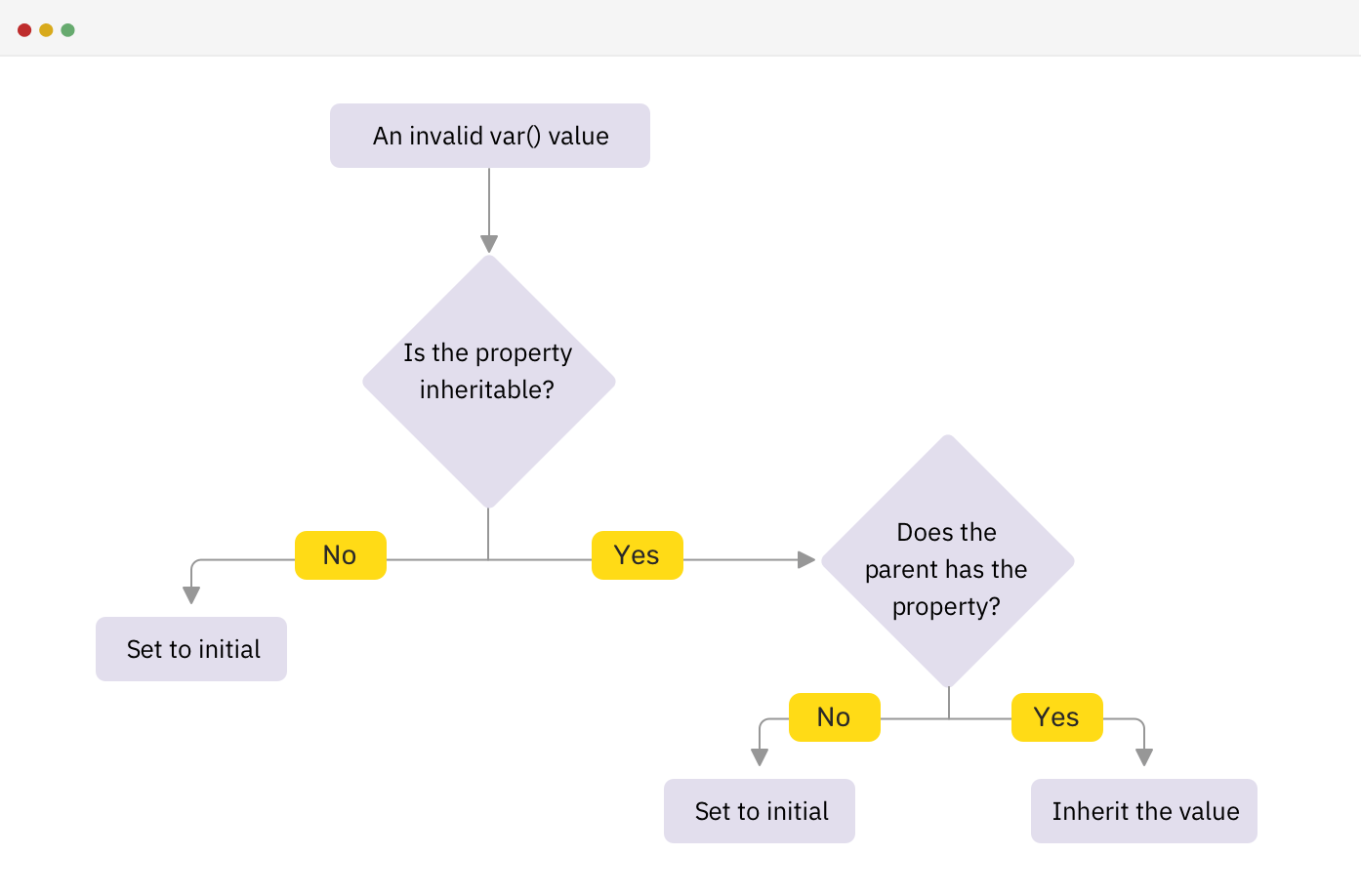
This is why thoughtfully naming variables is important.
Until it is used, the variable is considered VALID. It’s only once the variable is applied to a property that it is computed and found to be INVALID.
This is referred to as invalid at computed-value time.
Strong naming conventions can help prevent from throwing your property into the void of the cascade.
While sometimes such an error can be caused by the user, silly user, often this mistake is found when a variable is using a mathimatical function like calc(), min(), max(), clamp() or repeat() that does not compute correctly.
Invalid values as fallbacks
So what happens when a variable is invalid and used as a fallback?
The brower will still discard the entire declaration, rather than using the default value.
<!DOCTYPE html>
<html>

<head>
  <title>ID Sandbox</title>
  <meta charset="UTF-8" />
  <link rel="stylesheet" href="/base.css" />
  <link rel="stylesheet" href="/styles.css" />
</head>

<body>
  <div class="grid">
    <article class="card card--hope">
      <h2>Episode IV:</br>A New Hope</h2>
      <div class="skeleton-text"></div>
      <div class="skeleton-text"></div>
      <button>Watch</button>
    </article>
    <article class="card card--empire">
      <h2>Episode V:</br>The Empire Strikes Back</h2>
      <div class="skeleton-text"></div>
      <div class="skeleton-text"></div>
      <button>Watch</button>
    </article>
    <article class="card card--jedi">
      <h2>Episode VI:</br>Return of the Jedi</h2>
      <div class="skeleton-text"></div>
      <div class="skeleton-text"></div>
      <button>Watch</button>
    </article>
  </div>
</body>

</html>
:root {
  --global-border-radius: 0.25rem;
  --color-blue: hsl(219.6 100% 50.2%);
  --color-green: hsl(141.6 72.4% 45.2%);
  --color-red: hsl(0.7 89.6% 57.2%);
  --color-slate: hsl(227.1 29.5% 16.7%);
  --color-white: hsl(0 0% 100%);
}

body {
  background: var(--color-slate);
  border: 2px solid white;
  block-size: calc(100vh - 12px);
  display: grid;
  font-family: 'Silka', sans-serif;
  font-size: 1.125rem;
  margin: 0.25em;
  padding: 0 2rem;
  place-items: center;
}

.grid {
  display: grid;
  grid-template-columns: repeat(3, 1fr);
  gap: 1rem;
}

h2 {
  font-size: 1.25rem;
  font-weight: bold;
  margin-block-start: 0;
}

.skeleton-text {
  block-size: 1.5rem;
  background: hsl(0 0% 90%);
  border-radius: 2px;
  inline-size: 90%;
}

button {
  appearance: none;
  background: hsl(0 0% 100%);
  border: 2px solid hsl(0 0% 50%);
  border-radius: 4px;
  font-size: 1rem;
  font-weight: bold;
  letter-spacing: 0.125em;
  padding: 0.5rem 1rem;
  text-transform: uppercase;
  margin-block-start: 1rem;
border-radius: var(--global-border-radius);
}

.card {
  display: grid;
  gap: 1rem;
  grid-template-rows: 1fr auto auto auto;
  padding: 2rem 1rem;
  background: var(--color-white);
  border: solid var(--card-color-primary, gray);
  border-width: 12px 4px 4px;
  border-radius: var(--global-border-radius);
}.card {
border-color: var(--card-color-primary, gray);
color: var(--card-color-primary, gray);
button {
border-color: var(--card-color-primary, gray);
}
&:where(.card--hope) {
--card-color-primary: var(--color-green);
}
&:where(.card--empire) {
--card-color-primary: var(--color-blue);
}
&:where(.card--jedi) {
--card-color-primary: 16px; /* invalid */
}
}Invalid Variables vs Invalid Property values
You may have seen in CSS when implementing a newer feature or unit type this pattern;
.card {
   /* We can assign the card a default height.. */
   height: 80vh;
   /* but let's say we want the browser to use the Line Height property if it is supported */
   height: 80lh;
}
If the browser does not support the lh unit, what will the card’s height be?
!! Spoiler Warning !!
If the browser does NOT support Line Height, it will use the default value of 80vh
CSS Variables by default do not work like this because they lack context. If we followed the same pattern for CSS Variables, it would end up throwing out both declarations, because by the time it sees the second declaration, it discards the first.
body {
   color: black;
}

.card {
   color: var(--card-color-primary, gray);
}

.card--jedi {
   --color-primary: yellow;
   --color-primary: 16px; /* invalid */
}
So what color is the card’s text?
!! Spoiler Warning !!
In the example above the card color property would be black because the first use was discarded and the second use is invalid, voiding the entire declaration and it’s fallback value.